
Kristina Somolyar
Lorem ipsum, dolor sit amet consectetur
About Me
Lorem ipsum dolor sit amet, consectetur adipisicing elit. Eum in eos saepe ipsa cupiditate accusantium voluptatibus quidem nam, reprehenderit, et necessitatibus adipisci labore sit veritatis vero tempore sequi at sed facere dolore. Quae obcaecati eius quasi doloribus illum minus fugit.
Lorem ipsum dolor sit amet, consectetur adipisicing elit. Eum in eos saepe ipsa cupiditate accusantium voluptatibus quidem nam, reprehenderit,
My Portfolio
PureBite Co. – MailChimp to Klaviyo Migration
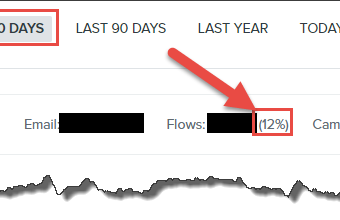
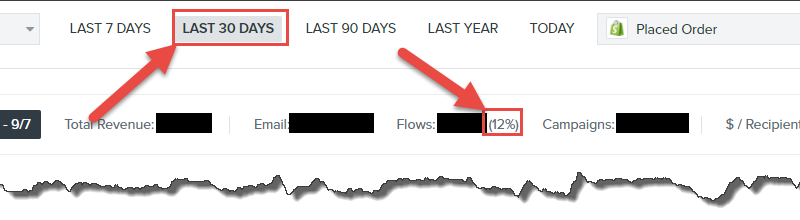
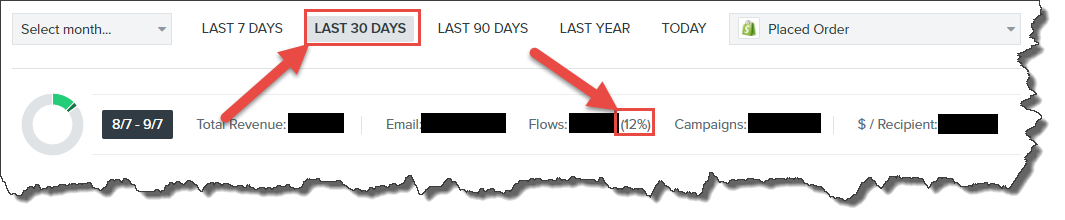
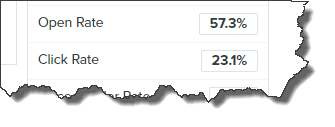
A gluten-free snack brand migrated platforms and saw a 12% revenue increase in 30 days — with a 55% open rate on the lead nurture flow and 43% on abandoned cart.
Key Results
| +12%Revenue Lift in 30 Days | 43%Abandoned Cart Open Rate | 14%Abandoned Cart CTR | 55%Lead Nurture Open Rate | 21%Lead Nurture CTR |
Background
PureBite Co. produces gluten-free snack bars, co-founded by two brothers. When Elliott reached out, they were running MailChimp — fine for basic sends, but not built for the revenue-driven automation a growing brand actually needs. The brief covered the full scope: strategy, migration planning, project management, and hands-on implementation.
One thing that made this project stand out: the consultant found PureBite on a grocery store shelf before the engagement even started, bought it, and tried it. Loved it. When the product genuinely delivers, email marketing becomes a lot easier to write.
Product & Klaviyo Flow Setup
PureBite Co. snack bars — spotted on a grocery shelf before the project started
Klaviyo flow setup post-migration from MailChimp
Klaviyo Flow Performance
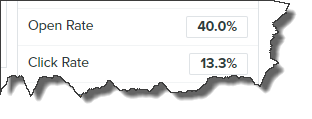
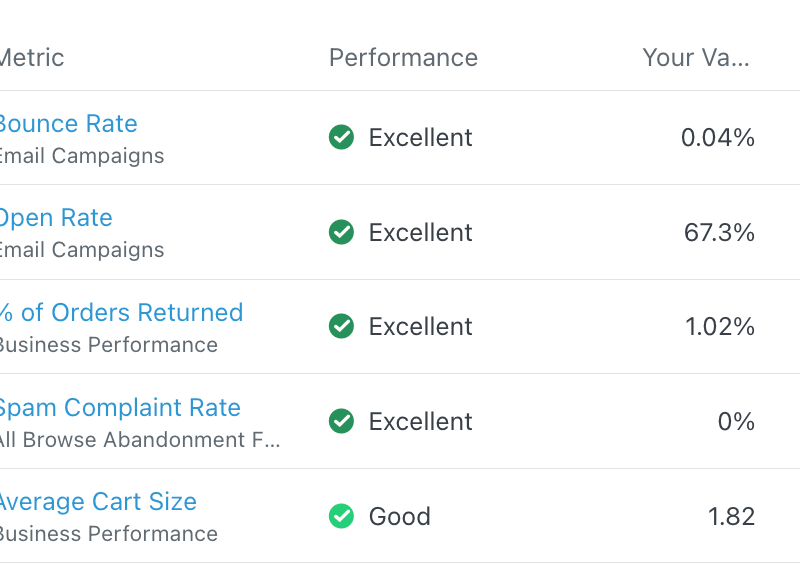
These are the actual Klaviyo stats from the flows after migration. The abandoned cart numbers alone show exactly how much PureBite was leaving on the table with MailChimp — a 43% open rate and 14% CTR is well above industry average for any ecommerce flow.

Overall flow performance — open rates, CTR, and revenue attribution
Abandoned Cart vs Lead Nurture – Stats Comparison

Abandoned Cart Flow — 43% open rate · 14% CTR

Lead Nurture Flow — 55% open rate · 21% CTR
| Metric | Result |
|---|---|
| Abandoned Cart — Open Rate | 43% |
| Abandoned Cart — Click-Through Rate | 14% |
| Lead Nurture — Open Rate | 55% |
| Lead Nurture — Click-Through Rate | 21% |
| Revenue Increase (first 30 days) | +12% |
What Made It Work
- The Right Platform — Klaviyo gave the segmentation, automation, and analytics muscle that MailChimp simply doesn’t have at this level for ecommerce. The migration itself unlocked capabilities that weren’t possible before.
- A Methodical Plan — Every step was mapped before execution started. No guesswork, no pivoting mid-project — a structured approach run through to completion.
- Two-Way Accountability — The consultant didn’t just build the strategy and hand it over. He held the client accountable to following it too. That shared ownership is what gets results across the finish line.
The Takeaway: Revenue was up 12% within the first 30 days. For a CPG brand selling through grocery and online, that kind of email-driven lift in a single month shows exactly what switching to the right platform — and running it properly — can do.
Results Summary
| Metric | Result |
|---|---|
| Revenue Increase (first 30 days) | +12% |
| Abandoned Cart Open Rate | 43% |
| Abandoned Cart CTR | 14% |
| Lead Nurture Open Rate | 55% |
| Lead Nurture CTR | 21% |
| Migration | MailChimp → Klaviyo |
| Services Delivered | Strategy, project management, full implementation |
Client Testimonial
“Very methodical and good at what he does. He lays out a plan and sticks to it — but most importantly he makes you stick to the plan as well. His dedication and commitment to client satisfaction really stood out throughout the whole project.”
Elliott R. — Co-Founder, PureBite Co.
★★★★★
$700,000+ Revenue in One Year with Klaviyo Email Marketing
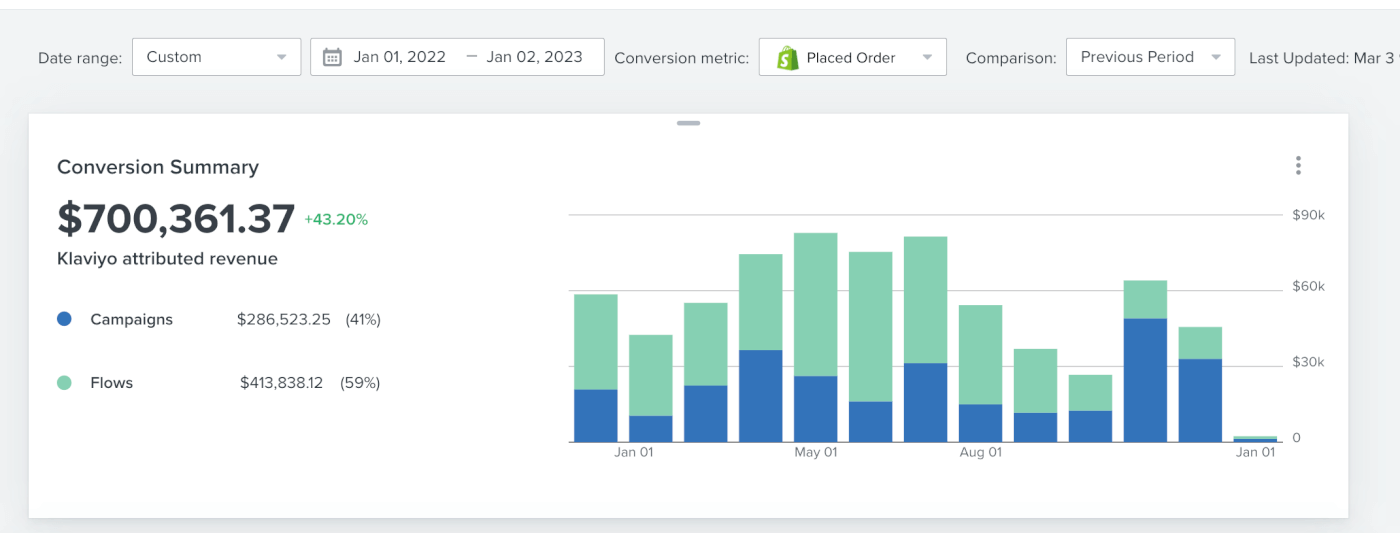
Twelve months. Ten automations built in the first three months. $700,361 in attributable email revenue – 59% from flows, 41% from campaigns.
Key Results
| $700,361Total Revenue (1 Year) | $413,838From Flows — 59% | $286,523From Campaigns — 41% | 10Automations (First 3 Months) |
Klaviyo Dashboard — Annual Revenue Overview
The screenshot below is the full-year Klaviyo summary for this client. Flows doing the heavy lifting at 59%, campaigns supporting consistently throughout the year.
Klaviyo annual revenue — $700,361 total, flows 59%, campaigns 41%
Revenue Breakdown — Flows vs Campaigns

Flow revenue attribution — $413,838 across automated sequences

Campaign revenue — $286,523 from 12 months of consistent sends
Flow Architecture
Ten automations were live within the first three months, covering every stage of the customer lifecycle from welcome through to win-back. Once built, they ran 24/7 without any manual effort.

10 automated sequences — all built in the first 3 months
Reporting & Analytics Dashboard
Every decision was backed by data from Klaviyo, Google Analytics, Shopify, and custom dashboards. Weekly and monthly reports kept the client aligned at every stage.

Reporting dashboard used for regular client performance updates
Full Strategy Breakdown
- Opt-ins & List Building — Lead magnets, landing pages, and on-site capture forms to grow a clean, engaged list before anything else went live.
- Segmentation — List split by behaviour, purchase history, and interests so every send reached the right person at the right time.
- Email Design — Mobile-first templates, brand-consistent, built to drive clicks — not just opens.
- Content Creation — Storytelling, education, promotions, and time-limited offers — a full content mix that keeps subscribers engaged month after month.
- 10 Automations — All configured within the first 3 months and running 24/7 across the entire customer lifecycle from day one.
- A/B Testing & Analytics — Continuous subject line, copy, and CTA testing — tracked via Klaviyo, Google Analytics, Shopify, and custom dashboards.
The Takeaway: Flows generated 59% of revenue without a single manual send. That’s what building the automation infrastructure right from the start actually looks like. Campaigns added the other 41%, keeping the brand front of mind all year without the list going cold.
Results Summary
| Metric | Result |
|---|---|
| Total Klaviyo Revenue (12 months) | $700,361 |
| Revenue from Automated Flows | $413,838 (59%) |
| Revenue from Campaigns | $286,523 (41%) |
| Automations Built | 10 (within first 3 months) |
| Reporting Cadence | Weekly & Monthly |
| Platforms Tracked | Klaviyo, Shopify, Google Analytics |
$34,000+ Revenue in 30 Days with Klaviyo Email Marketing
Klaviyo Email Marketing · Case Study
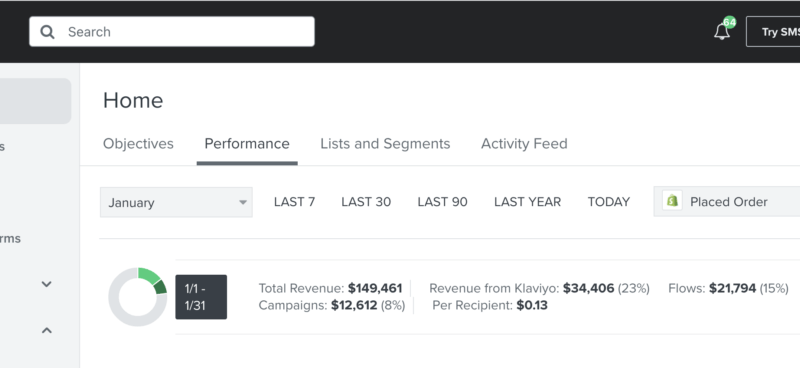
One month. One focused execution. Klaviyo’s share of total revenue nearly doubled — from 12% in December to 23% within 30 days.
Key Metrics
| $34,000+Total Klaviyo Revenue (30 Days) | $21,000+From Flows | $12,000+From Campaigns | 12% → 23%Klaviyo Revenue Share |
Background
The client was an ecommerce brand focused on customer retention.
When I stepped in, Klaviyo was contributing around 12% of total store revenue. One month after the new strategy launched, that number climbed to 23% — nearly doubling email’s contribution to the business. The $34,000+ total in that single month tells the rest of the story.
Klaviyo Dashboard – 30-Day Results
The screenshot below is from the client’s actual Klaviyo account at the close of the 30-day period. Flows and campaigns running together, each pulling their weight.

Klaviyo dashboard — $34k+ revenue, 23% of total store revenue across 30 days
The 6-Step Process
- Full Klaviyo Account Audit — Every flow, campaign, segment, and benchmark already in place was reviewed. You can’t improve what you haven’t measured properly.
- Gap & Opportunity Mapping — The audit flagged room for more split testing inside existing flows and uncovered 5 new flows that hadn’t been built yet — all leaving revenue behind.
- Revised Campaign Calendar — Shifted to 2–3 sends per week with a full month planned in advance. A/B testing on subject lines was built in from day one.
- Segmentation Overhaul — A new Hyper-engaged segment was created — high-intent subscribers who tolerate higher send frequency without bouncing off the list.
- Strategy Deployment — Executed using a proven ClickUp marketing template already refined across multiple ecommerce clients.
- Execution — Right designs, right messaging, right segmentation, right split tests — all firing together. Execution is where results actually happen.
A/B Testing – Subject Line Open Rates
Subject line testing was live across every campaign. The screenshot below captures open rate performance across the A/B splits — this is the data that shapes what you write next month.

Subject line A/B test results — open rate comparison across campaign variations
Key Insight: It’s all about execution — getting the right designs, messaging, segmentation, and split tests firing together. The strategy matters, but what you actually do with it matters more.
Results Summary
| Metric | Result |
|---|---|
| Total Klaviyo Revenue (30 days) | $34,000+ |
| Revenue from Automated Flows | $21,000+ |
| Revenue from Campaigns | $12,000+ |
| Klaviyo Revenue Share — December Baseline | 12% |
| Klaviyo Revenue Share — After 30 Days | 23% |
| New Flows Created | 5 |
| Campaign Send Frequency | 2–3 per week |
How StridePets Gained an Extra 31% in Revenue Through Flows & Email Campaigns
Email Marketing · Klaviyo Case Study
In 2 months, the brand re-engaged potential customers and started selling big – built from zero email infrastructure on Klaviyo and Shopify.
Key Results
| 6.5%Desktop Sign-up Rate | 5.9%Mobile Sign-up Rate | $14,500Welcome Flow / Month | $2,400Abandoned Checkout / Month |
| $1,100Browse Abandonment / Month | $667Abandoned Cart (First 4 Days) | ~$600Avg Revenue per Campaign | +31%Overall Revenue Increase |
The Challenge
StridePets came in with almost no email marketing in place. No flows. No segmentation. No strategy — just a Shopify store sitting on untapped subscriber data. Three core things needed fixing before anything else could happen:
- No foundational flows – zero automated engagement with subscribers
- No audience segmentation – everyone was getting the same message
- No data-driven campaigns – sends were ad hoc with no performance tracking
The Strategy
Klaviyo was integrated with Shopify and an entire email system was built from scratch. Pop-up forms to capture emails, segmented lists for targeted messaging, and seven automated flows covering every stage of the customer lifecycle. Once the flows were producing results, six monthly campaigns were added on top to keep revenue consistent.
Flows built: Welcome · Abandoned Checkout · Abandoned Cart · Browse Abandonment · Post-Purchase · Sunset · Win-Back
Pop-Up Opt-in Form
The list-building engine. A well-designed pop-up hitting 6.5% on desktop and 5.9% on mobile — solid numbers before a single email goes out.
Pop-up opt-in form — 6.5% desktop, 5.9% mobile sign-up rate
Welcome Flow — $14,500 / Month
Three emails over four days. Every new subscriber gets a sequence that introduces the brand, addresses common objections, and gives people a reason to buy. At $7.90 revenue per recipient, this single flow pays for itself over and over.

Welcome Flow structure — 3 emails across 4 days
Welcome email design used in the flow
| Metric | Result |
|---|---|
| Revenue | $14,500 / month |
| Revenue per Recipient | $7.90 |
| Number of Emails | 3 emails over 4 days |
| Audience | New subscribers |
Abandoned Checkout Flow – $2,400 / Month
These are the hottest prospects — shoppers who got all the way to checkout and left. Three emails over four days, each nudging them back with increasing urgency. $7.03 per recipient. This flow alone could justify the entire email setup.

Abandoned Checkout Flow — 3 emails, 4-day window
Abandoned Checkout email design
| Metric | Result |
|---|---|
| Revenue | $2,400 / month |
| Revenue per Recipient | $7.03 |
| Number of Emails | 3 emails over 4 days |
Browse Abandonment Flow — $1,100 / Month
Two emails triggered when someone browses products but adds nothing to cart. First fires at 2 hours, second at 2 days. Lower-intent audience, but $1.21 per recipient adds up to $1,100 every month running on full autopilot.
| Metric | Result |
|---|---|
| Revenue | $1,100 / month |
| Revenue per Recipient | $1.21 |
| Email 1 Timing | 2 hours post-browse |
| Email 2 Timing | 2 days post-browse |
Abandoned Cart Flow — $667 in First 4 Days
Cart abandoners who didn’t reach checkout. The flow launched and pulled in $667.90 in its first four days — $6.24 per recipient. A strong early signal for a flow that only improves with time and testing.
| Metric | Result |
|---|---|
| Revenue (first 4 days) | $667.90 |
| Revenue per Recipient | $6.24 |
Campaign Performance
Six campaigns per month running alongside the flows — a mix of proven formats and fresh experiments. Each campaign averaged ~$600 in revenue, not counting promotional or sale-day spikes.

Client Testimonial
“The team delivered weekly reports showing exactly what was invested and what came back from it. Transparency from day one, results to match.”
Jason P. — COO, StridePets
★★★★★
How Strategic Copy, Image Editing & Store Architecture Tripled Monthly Sales on Payhip
CASE STUDY
Project at a Glance
| Project | The Original Recipe Vault — vault.theoriginalrecipe.com |
| Platform | Payhip (custom storefront) |
| Deliverables | Store build, product copywriting, image editing |
| Tools Used | Payhip, Canva, Adobe Photoshop |
| Audience | Busy moms and health-conscious families |
| Result | Sales grew from 11 to ~30 per month — 173% increase |
Project Overview

The Original Recipe Vault is a digital product store on Payhip built at vault.theoriginalrecipe.com. It’s a membership-based library of 28 digital products covering food, nutrition, health planning, and wellness — built specifically for busy moms and health-conscious families who don’t have time to piece things together from 15 different sources.
This wasn’t a template drop and a quick launch. Every page on the store was built from scratch. Every product title, description, and bullet point was written to convert. Every image was edited and formatted to look professional across both desktop and mobile.
The vault sits inside The Original Recipe brand ecosystem and serves as the monetisation engine — the place where the audience’s everyday problems become purchases.
The Challenge
Digital product stores fail for one of three reasons: weak copy, poor visuals, or a store that doesn’t feel trustworthy. Most of the time it’s all three at once.
The vault needed to serve a broad audience — women dealing with ADHD kids, diabetes management, budget cooking, pregnancy nutrition, gut health, and fitness — without feeling scattered. That’s hard to pull off with 28 products on one storefront.
Specific challenges going in:
- No existing product copy — every description had to be written cold
- Product imagery needed to be consistent, clean, and on-brand across all 28 items
- The Payhip store had to be built and configured from scratch
- Products covered completely different topics, so the copy tone had to stay coherent without sounding generic
- The audience doesn’t respond to clinical health language — they respond to straight talk that respects their time
What Was Built
Three things came together to make this work: store architecture, copywriting, and visual design — all handled in one place.
Payhip Store Architecture

Full store setup including product pages, categories, checkout configuration, membership tier, and storefront layout. Everything a customer touches from the moment they land to the moment they download.
Product Copywriting – All 28 Products

Every product title, description, and feature list written from scratch. Each one speaks directly to the person with that specific problem — not a generalised buyer pulled from a template.
Visual Asset Editing
Product images edited and formatted using Canva and Adobe Photoshop. Consistent sizing, brand-appropriate styling, and clean presentation across the entire library — so every product looks worth its price before the customer reads a single word.
The Copy Approach

The copy across this vault was written with one rule: talk to the actual person, not the market segment.
Someone buying the Acid Reflux Food Guide isn’t browsing — they’ve already Googled their symptoms at 11pm and now they want a list that tells them exactly what to avoid. Someone buying the ADHD Life Planner is a grown adult who has bounced off every productivity system built for brains that work differently. The writing reflects that.
No filler. No vague promises. Just: here’s the problem, here’s what’s inside, here’s why it works.
“100 breakfast, lunch, and dinner recipes built specifically around the cheapest, most accessible ingredients at your grocery store — that your family will genuinely want to eat.”
— Opening line, Frugal Recipe: 100 Cheap Meals
“The planner for ADHD brains that have failed at every other planner — because those planners were built for neurotypical brains.”
— ADHD Life Planner product description
Every product page followed the same structure:
- Lead with the specific problem, not a vague category
- One sentence that earns the trust of the right buyer and filters out the wrong one
- Feature bullets written as outcomes, not just contents
- No jargon. No assumed knowledge. No clinical distancing.
Product Library at a Glance
28 products covering food, nutrition, fitness, health management, and planning. Price points range from $5 to $47 for standalone products, with a $19.99/month membership for full library access.
| Product | Price | Category |
|---|---|---|
| Frugal Recipe — 100 Cheap Meals | $15.99 | Recipe Collections |
| The Complete Kitchen Library | $47.00 | Bundled Systems |
| Nutrition For Kids | $15.00 | Family Health |
| The Anti-Ageing Diet Secrets | $27.00 | Nutrition + Wellness |
| Pregnancy Diet Plan | $27.00 | Specialist Nutrition |
| Low Carb For Women | $19.00 | Hormonal Health |
| Digital Recipe Planner | $8.97 | Digital Planners |
| Family Meal Planner | $17.00 | Meal Planning |
| Organic Living Mastery | $37.00 | Clean Living |
| Fit in 15 | $21.99 | Fitness |
| Acid Reflux Food Guide | $11.00 | Symptom Management |
| Total Yoga Mastery | $37.00 | Fitness + Wellness |
| Gut Health Mastery | $37.00 | Digestive Health |
| ADHD Life Planner | $17.00 | Neurodivergent Planning |
| Kids ADHD Planner | $21.00 | Family Planning |
| My Diabetes Journal | $9.00 | Health Tracking |
| The Low Carb Diabetes Solution | $19.97 | Medical Nutrition |
| Diabetes Type 2 Food Guide | $9.99 | Medical Nutrition |
| Wellness Tracker | $17.00 | Health Tracking |
| Medical Planner | $17.00 | Health Tracking |
| High Protein Snack Ideas | $17.00 | Recipe Collections |
| The Ultimate Fitness Planner | $12.97 | Fitness |
| Low Carb in 30 Days | $5.00 | Nutrition Plans |
| The Modern Plant-Based Diet | $27.00 | Specialist Nutrition |
| The Ultimate Guide To Superfoods | $5.00 | Nutrition Education |
| Homemade Dog Treats | $12.00 | Lifestyle |
| 2026 & 2027 Calendar | $11.97 | Productivity |
| Vault Membership | $19.99/mo | Full Library Access |
Results
Sales went from 11 per month to around 30 per month after the store was built, all 28 products were written, and the visual assets were updated. That’s a 173% increase — without changing the underlying products, running any paid ads, or pushing outside traffic.
The growth came entirely from better presentation: tighter copy, cleaner images, and a store that actually reflected the quality of what was being sold.
| Monthly Sales Before | 11 |
| Monthly Sales After | ~30 |
| Total Growth | +173% |
The membership model adds a compounding layer on top. Once someone joins at $19.99/month, their monthly value exceeds the cost of most single products by month two. With 28 products already in the library and new ones added monthly, the membership is the most efficient path to the entire catalogue.
What This Demonstrates
This project shows what happens when store setup, copywriting, and visual design are handled together — not split across three different people who’ve never spoken to each other.
- A Payhip store built and configured to convert, not just to display products
- 28 pieces of product copy written from scratch, each speaking to a distinct buyer with a distinct problem
- Image editing that makes a digital product feel worth its price before anyone reads a word
- A consistent brand voice across a 28-product library covering completely different topics
- Results that came from the quality of the work, not ad spend
Work With Simon
Building a digital product store, launching a vault, or sitting on a product library that’s not converting the way it should? This is the kind of work I do.
Store setup. Product copy. Visual assets. Or all three at once.
Comprehensive ClickFunnels Landing Page Project
I have successfully designed, written content for, and optimized several landing pages using ClickFunnels. Each project involved meticulous attention to detail, ensuring both compelling copy and high conversion rates. Here are some of the notable projects:
- Wedding Filmmaker Mastery
- Visit Site
- Aimed at helping wedding filmmakers enhance their craft and business acumen.
- MyCoach School
- Visit Site
- A platform for coaches to grow their business and reach their full potential.
- Retire SA
- Visit Site
- Providing resources and guidance for a secure retirement in South Africa.
- Skylark Bookkeeping Services
- Visit Site
- Offering professional bookkeeping services tailored to small businesses.
- Fit Warrior
- Visit Site
- A fitness program designed to transform lives through disciplined training and nutrition.
- Project Buddy Services
- Visit Site
- Dedicated to supporting students with academic projects and tasks.
- The Chiropractic University
- Visit Site
- Educating future chiropractors with comprehensive courses and resources.
- Course From Scratch Masterclass
- Visit Site
- Teaching individuals how to create and launch their own online courses.
- Prime Real Estate
- Visit Site
- A platform for real estate professionals to connect and thrive in their industry.
- The iDudes News
- Visit Site
- Providing the latest updates and news in the tech world.
- Start Repairing Credit
- Visit Site
- Helping individuals improve their credit scores with practical advice and solutions.
Each landing page was crafted to target specific audiences, with a focus on clear messaging and user-friendly design to maximize engagement and conversions. My expertise in both content creation and CRO has consistently delivered excellent results for my clients.
Our Trusted Client
Testimonial
Nevine Acotanza
Chief Operating OfficerAndroid App Development
via Upwork - Mar 4, 2015 - Aug 30, 2021 testMaecenas finibus nec sem ut imperdiet. Ut tincidunt est ac dolor aliquam sodales. Phasellus sed mauris hendrerit, laoreet sem in, lobortis mauris hendrerit ante. Ut tincidunt est ac dolor aliquam sodales phasellus smauris test
Jone Duone Joe
Operating OfficerWeb App Development
Upwork - Mar 4, 2016 - Aug 30, 2021Maecenas finibus nec sem ut imperdiet. Ut tincidunt est ac dolor aliquam sodales. Phasellus sed mauris hendrerit, laoreet sem in, lobortis mauris hendrerit ante. Ut tincidunt est ac dolor aliquam sodales phasellus smauris
Nevine Dhawan
CEO Of OfficerAndroid App Design
Upwork - Mar 4, 2016 - Aug 30, 2021Maecenas finibus nec sem ut imperdiet. Ut tincidunt est ac dolor aliquam sodales. Phasellus sed mauris hendrerit, laoreet sem in, lobortis mauris hendrerit ante. Ut tincidunt est ac dolor aliquam sodales phasellus smauris
My Blog
How to Hire The Right Freelancer for Your Business: A Comprehensive Guide
In today’s fast-paced business environment, businesses often need the expertise of freelance professionals to help with specific projects.
Hiring a freelancer can be a cost-effective solution for many businesses, but finding the right one for your business needs can be challenging.
That’s why it’s essential to understand how to hire the right freelancer for your business. This article will provide a comprehensive guide to help you find and hire the best freelancer for your needs.
Defining Your Business Needs
The first step in finding the right freelancer for your business is to define your business needs.
This involves understanding what the project entails and what specific skills are required to complete it. Do you need a freelancer for a specific task or for a longer-term project?
Are there specific software or technologies required? Understanding your business needs will help you find the right freelancer with the necessary skills and experience.
Creating a Job Description
Once you have defined your business needs, it’s time to create a job description. This should include a detailed description of the project, the required skills, and any specific requirements.
The job description should also include information about the compensation and expected timeline for the project.
A well-written job description will help attract the right candidates and make the hiring process easier.
Finding Freelancers
Now that you have defined your business needs and created a job description, it’s time to start looking for freelancers. There are several ways to find freelancers, including:
- Online job boards
- Freelance websites
- Social media platforms
- Referrals from friends and colleagues
1) Online Job Boards
Online job boards such as Upwork, Freelancer, and Guru, are a great place to find freelancers. You can post your job description and receive proposals from freelancers around the world. You can also search for freelancers based on specific skills and experience.
2) Freelance Websites
There are also many dedicated freelance websites, such as Fiverr, where you can find freelancers for a variety of projects.
You can browse through the profiles of different freelancers and see their portfolio and reviews from previous clients.
3) Social Media Platforms
Social media platforms such as LinkedIn and Twitter can also be a great place to find freelancers. You can search for freelancers based on specific skills and industries, and reach out to them directly.
4) Referrals from Friends and Colleagues
Lastly, referrals from friends and colleagues can be a valuable source of information. Ask for recommendations from people you trust and see if they have any experience working with freelancers.
Screening Freelancers
Once you have a list of potential freelancers, it’s time to screen them.
This involves reviewing their portfolios, experience, and references to determine if they fit your business needs. You can also ask them to complete a short test project to evaluate their skills and work quality.
1) Reviewing Portfolios and Experience
Start by reviewing the freelancer’s portfolio and experience. Look for projects that are similar to what you need, and check their portfolio for quality and professionalism. You can also review their experience to see if they have the necessary skills and experience for your project.
2) Checking References
Next, check references from previous clients. This will give you a good understanding of the freelancer’s work ethics, communication skills, and overall performance. You can ask for references directly from the freelancer or check their reviews and ratings on the freelance websites they are listed on.
3) Evaluating with a Test Project
Finally, consider having the freelancer complete a small test project to evaluate their skills and work quality. This will give you a good idea of their ability to complete the project to your satisfaction, and can also help you determine if you have good working chemistry with the freelancer.
Negotiating and Hiring
Once you have screened and evaluated the freelancers, it’s time to negotiate and hire. This involves discussing the details of the project, compensation, and timeline, and coming to a mutually agreed-upon agreement. Here are a few things to keep in mind when negotiating and hiring:
- Be clear and concise about your expectations
- Discuss compensation and payment terms in detail
- Agree on a timeline and deadlines
- Discuss the scope of the project and any changes that may occur
Managing the Freelancer
Once you have hired the freelancer, it’s important to manage them effectively to ensure the project is completed to your satisfaction. Here are a few tips for managing freelancers:
- Provide clear and timely communication
- Establish clear expectations and deadlines
- Provide regular feedback and updates
- Respect their time and professional expertise
Conclusion
Hiring the right freelancer for your business can be a cost-effective solution for many businesses.
By defining your business needs, finding potential freelancers, screening and evaluating, negotiating and hiring, and managing effectively, you can ensure you find the right freelancer for your needs.
With these tips, you’ll be well on your way to hiring the right freelancer for your business.
Maximizing Your Website’s Local SEO Potential: A Comprehensive Guide
Local SEO is a crucial aspect of digital marketing, particularly for businesses that rely on foot traffic and in-person interactions.
Optimizing your website for local search engines can improve your chances of appearing at the top of search results when potential customers search for related businesses in your area.
In this article, we’ll provide a step-by-step guide on optimizing your website for local SEO and taking your online presence to the next level.
Key Elements for Optimizing Your Website for Local SEO
1) Accurate Business Information
Ensure that your website includes accurate, up-to-date information about your business is essential for local SEO success. This information should include your business name, address, phone number (NAP), and business hours. It is important to ensure this information is consistent across all platforms and directories. Inconsistent information can confuse potential customers and negatively impact your local search ranking.
2) Claim Your Google My Business Listing
Google My Business (GMB) is a free tool offered by Google that allows businesses to manage their online presence across Google, including search and maps.
By claiming and verifying your GMB listing, you can improve your website’s local SEO. Make sure to include as much information as possible on your GMB listing, such as business categories, photos, and customer reviews.
This will give potential customers a comprehensive understanding of your business and can help improve your local search ranking.
3) Focus on Relevant Keywords
Incorporating relevant keywords into your website’s content and meta tags can help improve your local search ranking.
For example, if you’re a bakery in Los Angeles, include keywords such as “bakery in Los Angeles” and similar phrases throughout your website’s content and meta tags.
This will help search engines understand the focus of your business and display your website as a relevant result for local search queries.
Utilize Local Schema Markup Local schema markup is a code that helps search engines understand the context of your website’s content.
By adding local schema markup to your website, you can provide additional information about your business, such as your NAP, business hours, and product or service offerings.
This can improve your local search visibility and provide potential customers with more detailed information about your business.
Additional Tips for Improving Your Local SEO
1) Encourage Customer Reviews
Positive customer reviews can significantly impact your local search ranking and your credibility and reputation in the eyes of potential customers.
Encourage satisfied customers to leave reviews on platforms such as Google, Yelp, and Facebook.
Responding to positive and negative reviews can also help improve your online reputation and strengthen your customer relationship.
2) Build Local Backlinks
Backlinks from high-authority local websites can improve your local search ranking and establish your business as a trusted, relevant source of information in your industry. Look for opportunities to guest post on local blogs, participate in local events and sponsorships, and collaborate with other local businesses to build valuable backlinks.
Optimize for Mobile With most of the search traffic coming from mobile devices; it’s essential to ensure that your website is optimized for mobile. This includes responsive design, fast load times, and easy navigation on smaller screens.
3) Utilize Google Posts
Google Posts is a feature within GMB that allows businesses to share updates, promotions, and events directly on their GMB listing.
This can help improve your local search visibility and engage potential customers with fresh, relevant information about your business. Regularly updating your Google Posts can also show search engines that your business is active and relevant, impacting your local search ranking.
Frequently Asked Questions about Local SEO
1) How important is local SEO for small businesses?
Local SEO is especially important for small businesses as it allows them to compete against larger, well-established companies. By optimizing their website for local search engines, small businesses can improve their visibility and attract new customers in their local area.
2) How does local SEO differ from traditional SEO?
Traditional SEO focuses on improving a website’s ranking in search results for general, non-local search terms. On the other hand, local SEO focuses on improving a website’s ranking in search results for local search terms, such as “bakery in Los Angeles.”
How often should I update my GMB listing?
It is recommended to regularly update your GMB listing with accurate, up-to-date information, including any changes to your business hours, contact information, or offerings. Additionally, regularly updating your Google Posts can help improve your local search visibility and show search engines that your business is active and relevant.
SEO for Small Businesses: How to Compete with Big Players
As a small business owner, you may feel overwhelmed by the competition from larger companies.
However, with the right strategy, you can compete with the big players and attract new customers to your business through search engines like Google. Search Engine Optimization (SEO) is a powerful tool to help you achieve this goal.
This article will explore the steps you can take to improve your website’s SEO and increase your visibility in search results. By the end, you will have a solid understanding of how to use SEO to boost your small business and take on the big players in your industry.
Small businesses often feel outmatched by larger companies in their industry, but with the right SEO strategy, they can compete and attract new customers through search engines.
As a small business owner, you know the importance of reaching new customers and growing your business. However, with the abundance of large companies vying for the same attention, it can be difficult to stand out and be seen. This is where Search Engine Optimization (SEO) comes in. SEO is optimizing your website to rank higher in search results and attract more organic traffic.
With the right SEO strategy, you can level the playing field and compete with even the biggest players in your industry. In this article, we’ll explore the steps you need to take to improve your website’s SEO and increase your visibility in search results.
Understanding SEO
Before we dive into the specific steps you need to take to improve your SEO, it’s important to understand what SEO is and how it works.
SEO involves optimizing your website to rank higher in search engine results pages (SERPs) for keywords related to your business. This increased visibility can attract more organic traffic to your site, leading to more leads, sales, and customers.
Keyword Research
The first step in improving your SEO is to conduct keyword research.
This involves identifying the keywords people use to search for products or services related to your business. Once you have a list of keywords, you can optimize your website to rank higher for those keywords in search results.
Several tools are available for keyword research, including Google Keyword Planner and SEMrush.
These tools can help you find relevant keywords and determine their competition level, which can help you decide which keywords to target.
On-Page Optimization
Once you have identified your keywords, the next step is to optimize your website for those keywords. This involves making changes to your website’s content and structure to ensure that it is optimized for search engines. Some of the most important on-page optimization factors include:
- Title tags
- Meta descriptions
- Headings (H1, H2, H3)
- Content
- Image optimization
- URL structure
Optimizing your website’s on-page factors can help search engines understand what your site is about and what keywords it should rank for. This, in turn, can lead to higher rankings in search results.
Off-Page Optimization
In addition to on-page optimization, you also need to focus on off-page optimization. This involves optimizing factors outside of your website that can impact your rankings, such as:
- Backlinks
- Social media signals
- Local citations
By building high-quality backlinks from other websites and promoting your site on social media, you can improve your website’s off-page optimization and increase your visibility in search results.
Tracking and Measuring Your Results
Once you have implemented your SEO strategy, tracking and measuring your results is important to see how well your efforts are paying off. Several tools are available for tracking your rankings, such as Google Analytics and Ahrefs.
These tools can help you see how your website is performing in search results and identify areas for improvement.
Additionally, you should regularly review your website’s traffic, leads, and conversions to see if there is a direct correlation with your SEO efforts.
By tracking and measuring your results, you can make informed decisions about your SEO strategy and adjust your efforts to achieve your goals.
Conclusion
SEO is a crucial tool for small businesses looking to compete with the big players in their industry.
By conducting keyword research, optimizing your website’s on-page and off-page factors, and tracking your results, you can improve your website’s visibility in search results and attract more organic traffic to your site.
While SEO can initially seem overwhelming, with the right strategy and tools, small businesses can compete with even the biggest players in their industry.
So, take the time to understand and implement SEO, and watch as your small business grows and flourishes.
In conclusion, SEO is a must-have strategy for small businesses looking to compete with larger companies in their industry.
By following the steps outlined in this article, you can improve your website’s visibility in search results and attract more organic traffic to your site, helping your business grow and succeed.
Contact With Me
Nevine Acotanza
Chief Operating OfficerI am available for freelance work. Connect with me via and call in to my account.
Phone: +01234567890 Email: admin@example.com